
Guide 08 of 12
How to Scrape Business Data from Websites
Collect public business data — company names, categories, locations, websites and opening hours — from directories and listings, legally and accurately.
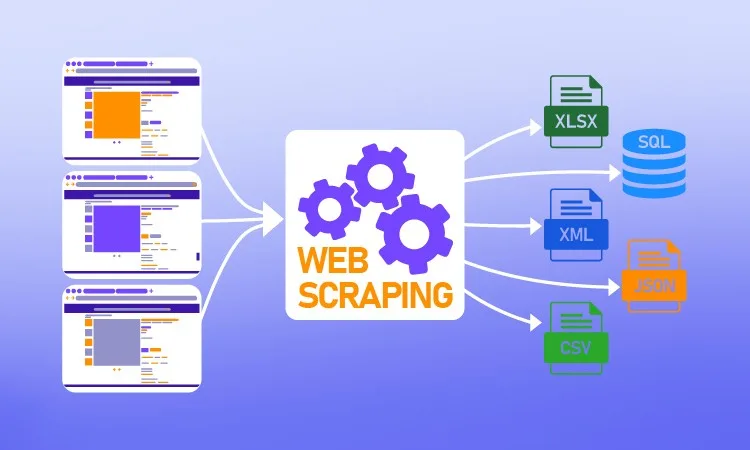
Businesses publish a lot of useful information about themselves: their name, category, city, website, opening hours, services and prices. Public directories, chamber-of-commerce lists, trade association member pages and event exhibitor lists collect thousands of these entries in one place.
Turning such pages into a spreadsheet is valuable for market research, competitor mapping, partnership research and local SEO. This guide shows how to extract business data with the Instant Data Scraper tool, which fields are appropriate to collect, how to structure and enrich the results, and — importantly — where public business information ends and personal data begins.
Good sources of public business data
Public directories
Industry directories, local business listings and "find a supplier" pages list companies in a consistent card layout — ideal for Automatic mode.
Association and member lists
Trade bodies and professional associations often publish member companies with category and location.
Event exhibitor lists
Trade-show websites list exhibitors with booth numbers, categories and websites.
Government and open-data portals
Company registers and licensing lists are often available as downloadable datasets. Always check for an official download or API first — it is more complete and clearly permitted.
Company websites
Store locators, "our locations" pages and partner lists on companies' own websites.
Which fields to collect
Appropriate business fields
- Company or trading name
- Category, industry or services
- Address, city, region and country of the business premises
- Website URL and listing URL
- Generic business contact channels published for that purpose (e.g. a main switchboard or info@ address)
- Opening hours, price range, year founded
Fields that need extra care
- Names of employees, owners or contacts
- Personal email addresses or mobile numbers
- Photos of people
Even when published on a business page, information about an identifiable person is personal data under laws like the GDPR. Sole traders' business details can also be personal data. Unless you have a clear lawful basis, leave these fields out.
How to extract a business directory
Step 1: Start with Automatic mode
Paste the directory URL. The listing cards are usually the top dataset, e.g. "Items 1 — div.listing ×25", with columns for name, category, city and website link.
Step 2: Clean up columns
Remove columns such as "Listing image", "Rating icon" or ad links. Keep name, category, location and URLs.
Step 3: Use CSS selectors for structured fields
Row selector:  .listing
Fields:
Business: h2
Category: .category
Street: [itemprop="streetAddress"]
City: [itemprop="addressLocality"]
Website: a.website@href
Listing URL: h2 a@href
Many directories use schema.org markup (itemprop), which makes selectors very reliable.
Step 4: Follow pagination
Directories are long. Enable pagination and set a page limit; the tool merges every page into one table.
Step 5: Export
Download Excel for analysis or CSV to import into a CRM or mapping tool.
Structuring and enriching the data
Normalise categories
Different directories describe the same industry differently ("Bakery", "Bakers & Confectioners"). Create a mapping table in Excel and use XLOOKUP to assign standard categories.
Split addresses
If the address is one text field, use Text to Columns by comma to separate street, city and postcode.
Deduplicate across sources
Combining several directories creates duplicates. Normalise the website domain (remove https://, www. and trailing slashes) and use it as the matching key.
Map it
Import the CSV into a mapping tool to visualise competitor density or market coverage by city.
Practical use cases
- Market sizing — count businesses per category and region.
- Competitor mapping — see where competitors operate and which services they list.
- Supplier research — build a shortlist of manufacturers or wholesalers in a category.
- Local SEO — check how consistently your business appears across directories.
- Academic research — study the distribution of business types.
Legal and ethical rules for business data
- Check the directory's terms — many prohibit bulk copying of their database. EU/UK database rights may protect the compilation as a whole.
- Prefer official data — use open-data downloads and APIs when available.
- Minimise personal data — keep to business-level information.
- No unsolicited marketing — anti-spam laws (such as CAN-SPAM, PECR and the GDPR) restrict sending marketing messages to scraped contacts.
- Be gentle — use page limits and delays.
This is general information, not legal advice.
Designing a good business dataset
Before scraping, decide on a consistent set of columns so data from different sources fits together:
| Column | Example | Notes |
|---|---|---|
| business_name | Northside Bakery | Trading name as displayed |
| category | Bakery | Normalised to your own list |
| city | Leeds | Separate from street address |
| country | United Kingdom | Use ISO codes if combining countries |
| website | https://northside.example | Used as the deduplication key |
| source_url | https://directory.example/northside | Where you found it |
| collected_on | 2026-11-17 | Date of extraction |
Keeping business data accurate
Directories go stale
Businesses close, move and rebrand. Treat directory data as a starting point and verify important records on the company's own website.
Watch for duplicates and chains
Chains may list each branch separately. Decide whether you want one row per company or per location, and keep the location ID if present.
Standardise formats
- Trim spaces and fix capitalisation with
=PROPER(TRIM(A2)). - Remove tracking parameters from website URLs (everything after
?utm_). - Use consistent country and region names.
Turning business lists into insight
- Density by area — count businesses per city or postcode district to find saturated and under-served markets.
- Category mix — compare the share of each category between regions.
- Digital presence — calculate the percentage of businesses that list a website.
- Opening hours — see which areas have late-night or weekend coverage.
- Change over time — re-extract quarterly and compare to spot openings and closures.
Privacy basics for business data
If your dataset contains anything about identifiable people — a sole trader's name, a contact person, a personal mobile number — data-protection laws apply. In practice:
- Purpose limitation — collect only for a specific, legitimate purpose.
- Minimisation — collect only the fields you need for that purpose.
- Transparency — individuals may have a right to know you hold their data.
- Retention — delete data when you no longer need it.
- Security — store files securely and limit who can access them.
The simplest way to stay safe is to keep your dataset strictly at the business level.
Walkthrough: mapping local bakeries
- Find a public directory category page for bakeries in your region.
- Extract with Automatic mode, then refine with CSS selectors for name, city and website.
- Enable pagination to collect all pages of the category.
- Export to CSV and remove duplicates using the normalised website domain.
- Count bakeries per city with a PivotTable.
- Import the CSV into a mapping tool to visualise clusters and gaps.
Notice that no personal names, personal emails or mobile numbers were needed to answer the business question.
Business data checklist
- Official open-data source checked first.
- Directory terms of service reviewed.
- Only business-level fields collected.
- Source URL and collection date recorded for every row.
- Categories normalised and duplicates removed.
- Data stored securely and deleted when no longer needed.
- No unsolicited marketing to collected contacts.
Why staying at the business level is smart
Most questions businesses ask about a market — how many competitors are there, where are they located, which services do they offer, how many have a website — can be answered entirely with business-level information. Personal details about owners or employees add legal obligations without adding much insight. Keeping your dataset focused on companies rather than people makes it simpler to store, easier to share inside your organisation and far less risky under data-protection law.
Business-level data is also more stable. People change jobs and phone numbers often; company names, categories and websites change much less frequently. A dataset built around the company website as its key stays useful for longer and is easier to update: you can re-extract the same directory in a few months and match rows on the domain to see which businesses are new and which have disappeared.
If your project genuinely requires contact with specific people, use channels designed for that — official contact forms, professional networks or licensed data providers that handle consent properly.
Who uses public business data
Entrepreneurs research how many similar businesses already operate in an area before opening a new location. Consultants size markets for clients by counting businesses per category and region. Local governments and researchers study the mix of businesses on high streets over time. Marketing teams check that their own business appears consistently across directories, which supports local search visibility. All of these uses rely on business-level facts, not on personal information.
Common mistakes with business data
- Treating directory data as complete — directories rarely list every business.
- Not recording sources — without a source column you can't verify or update records.
- Collecting people instead of companies — personal data creates legal obligations.
- Keeping data forever — set a review date and delete what you no longer need.
Key takeaways
- Check official open-data sources first.
- Collect business-level fields such as name, category, city and website.
- Use schema.org attributes for reliable selectors.
- Normalise categories and deduplicate by website domain.
- Never use collected contacts for unsolicited marketing.
Conclusion
Public business data from directories, association lists and company websites can answer important questions about markets, competitors and locations. Extract it with Automatic mode or precise CSS selectors, collect complete categories with pagination, and clean the result by normalising categories and deduplicating on the website domain. Keep your dataset at the business level, record sources and dates, check official open-data sources first and never use collected contacts for unsolicited marketing. That combination gives you accurate, useful business intelligence while respecting websites, privacy laws and the people behind the businesses.
Step-by-step instructions
Find a public directory page
Choose a listing page that shows businesses without requiring login.
Check for an official dataset
Look for open-data downloads or an API first.
Run Automatic mode
Paste the URL into the tool and check the listing dataset.
Refine with CSS selectors
Use itemprop attributes for address and name fields.
Enable pagination
Collect several pages into one table.
Export and clean
Normalise categories, split addresses, deduplicate by domain.
Example
| Business | Category | City | Website |
|---|---|---|---|
| Northside Bakery | Food & Drink | Leeds | https://northside.example |
| Brightline Print | Printing | York | https://brightline.example |
No personal names or personal contact details were collected — only business-level information.
Best practices
- Use official open-data sources whenever possible.
- Collect business information, not information about individuals.
- Use itemprop/schema.org attributes for stable selectors.
- Deduplicate on the normalised website domain.
- Never use scraped contacts for unsolicited marketing.
Open the Instant Data Scraper tool and extract your first dataset in seconds.
Frequently asked questions
It depends on the directory's terms, database rights and privacy laws in your country. Business facts are generally lower-risk than personal data. This is not legal advice.
Main business numbers published for customer contact are business information. Personal mobile numbers of individuals are personal data — avoid them.
Many directories protect their database. Respect the block and look for an official data source.
Export each to CSV, stack them in Excel or Power Query, and deduplicate on the website domain.
Quarterly is enough for most market research. Directories change slowly, and re-extracting too often adds load without much new information.
Yes. Match on company name and city, or better on website domain, and treat the official register as the authoritative source where they differ.