
Guide 01 of 12
What Is Instant Data Scraper?
A complete explanation of what Instant Data Scraper is, how automatic data detection works, what you can extract, who uses it and how to use it responsibly.
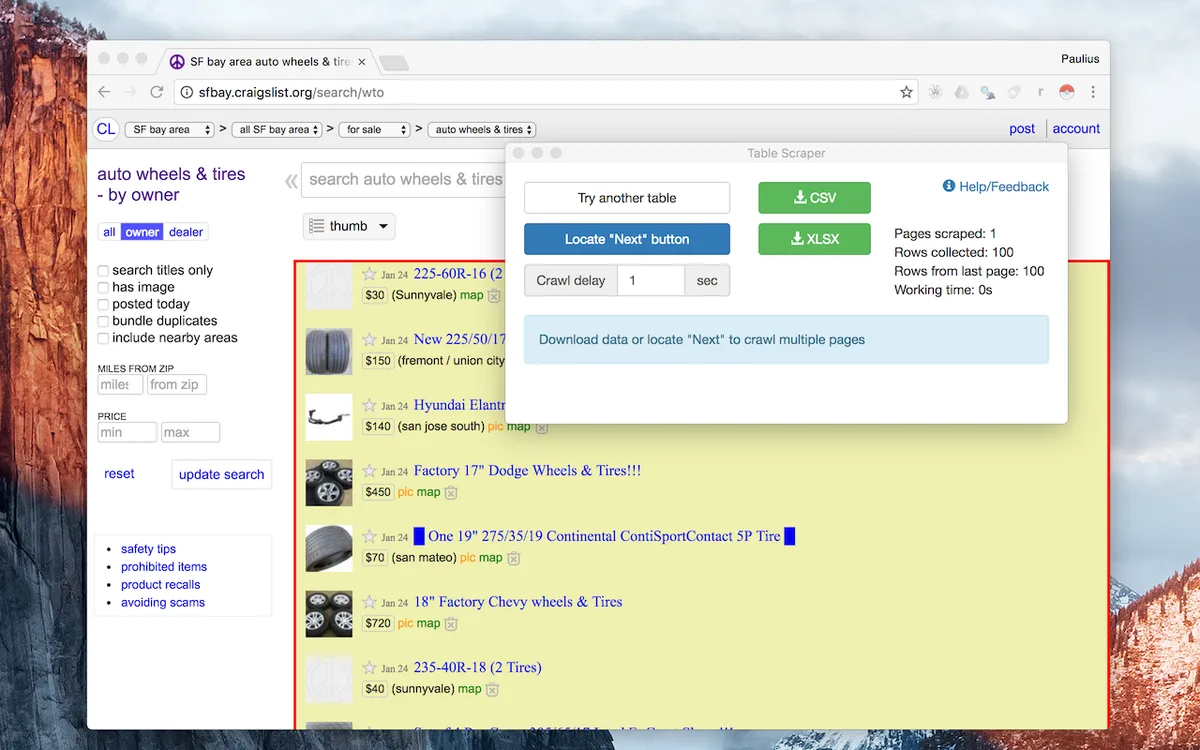
Instant Data Scraper is the name people use for a simple kind of web scraping tool: you open a web page, the tool automatically finds the data that repeats on that page — rows of a table, product cards, search results, directory listings — and lets you download it as a spreadsheet. No code, no setup, no complicated configuration.
The name is best known from a popular free browser extension for Chrome and Edge. This website, instantdatascraper.net, is an independent online tool built on the same idea: you paste a URL instead of installing anything, and the extraction runs on our server. In this guide you will learn exactly what an instant data scraper does, how its automatic detection works behind the scenes, what kind of data it is good at, where its limits are, and how to use it in a way that is fast, accurate and responsible.
Instant Data Scraper in one sentence
An instant data scraper is a point-and-extract tool that converts the repeating structure of a web page into rows and columns, which you can preview and export to Excel (.xlsx), CSV or JSON.
The word "instant" matters. Traditional web scraping means writing a program in Python or JavaScript, studying the page's HTML, writing selectors for every field and maintaining that code when the website changes. An instant data scraper skips all of that: it guesses the structure for you and shows the result in seconds. You only step in when the guess is wrong.
The browser extension and the online tool
There are two common ways people use an "Instant Data Scraper":
1. The Chrome/Edge browser extension
- Installed from the Chrome Web Store or Edge Add-ons store.
- Runs inside your own browser, on the page you currently have open.
- Can read pages you are logged in to, because it sees what your browser sees.
- Exports to CSV or XLSX and can click a "Next" button to crawl several pages.
- Published by a third party. Several 2026 reviews report that its original developer no longer actively maintains it, so always check the current store listing before relying on it.
2. The online tool on instantdatascraper.net
- Nothing to install — open the website on any device, including phones and tablets.
- You paste the URL of a public page; our server fetches it and extracts the data.
- Offers several modes: Automatic, HTML table, List, Custom CSS selector and JavaScript-rendered pages.
- Exports genuine Excel workbooks, UTF-8 CSV files and structured JSON.
- Respects robots.txt, waits politely between pages and never logs in to websites.
This website is independent and is not affiliated with the browser extension or its publishers. Both follow the same general idea, which is what the rest of this guide explains.
How automatic data detection works
Every web page is built from HTML — a tree of nested elements such as <div>, <table>, <li> and <a>. Websites generate listings from templates, so twelve products on a category page are usually twelve copies of the same HTML pattern with different text. An instant data scraper exploits that fact.
Step 1: Read the page structure
The tool downloads the page and parses its HTML into a document tree. Scripts, styles and other non-content elements are removed so they cannot pollute the results.
Step 2: Look for repeating groups
For every element on the page, the tool looks at its children and groups them by "signature" — the tag name plus CSS classes. If an element has twelve children that are all article.product-card, that is a strong candidate for a dataset.
Step 3: Score the candidates
Not every repeating group is useful data. Navigation menus and footers repeat too. Candidates are scored by:
- Number of items — more repetitions usually means a real listing.
- Amount of text — product cards contain names, prices and descriptions; menus contain one or two words.
- Richness — items with several fields, links and images rank higher.
- Location — groups inside
<nav>, headers and footers are penalised.
Step 4: Turn each item into a row
Inside each repeating item, every piece of text, every link URL and every image URL becomes a column. Column names are taken from the CSS classes on the page, so a well-built website produces readable headers such as Product title, Price and Rating.
Step 5: Let you choose
Because the guess can be wrong, the best candidates are shown as separate datasets. In the browser extension this is the "Try another table" button; on instantdatascraper.net you switch between dataset tabs above the preview.
What data can you extract?
Instant data scrapers shine on pages where information is laid out in a consistent pattern:
- HTML tables — statistics, rankings, sports results, timetables, price lists.
- Product listings — names, prices, ratings, availability and product URLs from category pages.
- Search results — titles, snippets and links from public search or listing pages.
- Public business directories — company names, categories, cities and websites.
- Job boards — job titles, companies, locations and posting dates.
- Article indexes — headlines, authors, dates and links from blog or news archives.
- Links, headings and images — as extra datasets for SEO audits and content inventories.
What it is not good at
- Long free-form text such as full articles (copy-paste or reader tools are better).
- Data inside images, PDFs or charts.
- Pages that require a login, payment or CAPTCHA — our online tool deliberately does not access them.
- Highly irregular pages where every item has a different layout.
Who uses an instant data scraper?
Researchers and students
Collecting a public table of statistics or a list of publications for a project takes seconds instead of an afternoon of copy-and-paste.
Marketers and analysts
Market research, competitor assortment analysis and price comparisons all start with a spreadsheet of public listings.
E-commerce teams
Product research, catalogue checks and tracking publicly displayed prices on a modest schedule.
Small businesses
Turning public directories or event listings into a list they can sort and filter.
SEO professionals
Extracting links and headings from pages for audits and internal-linking reviews.
Benefits and limitations
Benefits
- Speed — results in seconds, not hours.
- No coding — anyone who can copy a URL can use it.
- Accuracy — no copy-paste mistakes, merged cells or lost links.
- Clean exports — one value per cell, ready for formulas and pivot tables.
- Multi-page support — follow "Next" links to collect a whole listing.
Limitations
- Automatic detection is a guess; sometimes you must pick another dataset or use a CSS selector.
- Websites change their layout, so a method that worked last month may need adjusting.
- Some sites block automated requests; a responsible tool stops rather than trying to get around the block.
- JavaScript-heavy pages need a rendering engine (available on instantdatascraper.net where the server supports it).
Is it legal and safe to use?
Extracting public, non-personal information such as prices, statistics or product names is a common and widely accepted practice. Whether a specific use is lawful depends on where you live, the website's terms of service, copyright and database rights, and data-protection laws such as the GDPR. Keep these principles in mind:
- Only extract data that is publicly visible without logging in.
- Respect robots.txt and the website's terms.
- Do not overload websites — limit the number of pages and add delays.
- Do not collect personal information such as private emails, phone numbers or profiles.
- Use the data for analysis; do not republish someone else's content as your own.
This is general information, not legal advice. For commercial projects, speak to a qualified lawyer.
Instant data scraping vs. traditional scraping
| Instant data scraper | Custom code (Python, Node.js) | |
|---|---|---|
| Setup time | Seconds | Hours to days |
| Skills needed | Copy a URL | Programming, HTML, debugging |
| Control over fields | Automatic, refined with selectors | Complete |
| Maintenance | Minimal — re-run when needed | Code must be updated when sites change |
| Best for | Ad-hoc research, one-off lists, small recurring checks | Large, complex or automated data pipelines |
Most people never need custom code. If a page shows data in a consistent pattern and you need it in a spreadsheet today, an instant data scraper is the fastest route.
Key terms explained
Dataset
One table of extracted rows and columns. A single page can produce several datasets — for example the product grid, a table of specifications, and a list of links.
Row selector
A CSS selector that matches each repeating item, such as .product-card. Used in Custom CSS selector mode.
Pagination
Splitting a listing over several pages. A scraper follows the "Next" link to collect them all.
JavaScript rendering
Running a page in a headless browser so content created by JavaScript is available to extract.
robots.txt
A file on every website that tells automated tools which areas they should not visit. Responsible scrapers respect it.
Getting good results from day one
- Choose listing pages. Category, search and directory pages give the most data per request.
- Look at the preview, not just the row count. A high row count from a navigation menu is still the wrong data.
- Rename columns after export. Class-based names such as "Thumb image" are descriptive but you can rename them to suit your report.
- Keep a log. Note the URL, mode and date of each extraction so you can repeat it later.
Summary
An instant data scraper turns the repeating structure of a public web page into a clean spreadsheet in seconds. It is ideal for research, product and market analysis, directories and SEO work, and it requires no programming. Use it responsibly — public data only, polite request rates and no personal information — and you will save hours of manual copying every week.
Step-by-step instructions
Find a public page with repeating data
Open the page in your browser and confirm the data you need is visible without logging in — for example a table or a grid of products.
Copy the URL
Copy the full address from the browser bar, including
https://.Open the tool
Go to the Instant Data Scraper tool and paste the URL.
Keep Automatic mode
Automatic mode finds tables and repeating items on its own. Press Start Extracting.
Check the preview
Switch between dataset tabs if the first one is not what you need, and untick columns you don't want.
Download
Export the data as Excel (.xlsx), CSV or JSON.
Example
A public category page shows 24 desk lamps. Automatic mode detects the repeating article.product-card elements and returns:
| Product title | Product title link | Price | Rating |
|---|---|---|---|
| Aurora Desk Lamp | https://shop.example.com/p/1 | $43.99 | 4.1 out of 5 |
| Brass Clip Light | https://shop.example.com/p/2 | $14.99 | 3.9 out of 5 |
The product link became its own column automatically — something manual copy-and-paste usually loses.
Best practices
- Start with one page and check the result before enabling pagination.
- Use the most specific mode that works: Table mode for tables, CSS selector mode for tricky layouts.
- Keep the source URL and date with every export.
- Extract only public, non-personal data and respect robots.txt.
- Re-check your method when a website redesigns its pages.
Open the Instant Data Scraper tool and extract your first dataset in seconds.
Frequently asked questions
The browser extension is free to install. The online tool on instantdatascraper.net has a free plan; paid plans with higher limits are listed on the Pricing page.
No. Everything runs on our server; you only need a web browser.
No. It is an independent online tool and is not affiliated with the browser extension or any other websites.
It works on most public pages with repeating data. It does not access pages behind logins, paywalls or CAPTCHAs.